
 Last ned
Kviskr for Mac
Drag in an interview or press Start meeting. Kviskr turns Norwegian speech into text with speakers and timestamps, locally, without uploading the audio.
Last updated
Short answer
Norwegian audio in, text out, on your Mac.
Kviskr is a Mac app that transcribes Norwegian audio files and meetings locally, with NB-Whisper, the speech model from the National Library of Norway. You drag in an interview, a lecture or a voice memo, or record a meeting, and get the text with speakers and a timestamp for each line. The speech recognition and the speaker separation run on your Mac, so the audio is never uploaded, and it works offline. You choose bokmål or nynorsk as the written standard. The app itself is in Norwegian only.
| What | How it works in Kviskr |
|---|---|
| Audio formats | Files macOS can read, such as WAV, MP3, M4A, AAC, AIFF and FLAC. The original is not changed |
| Video | Not supported. Extract the audio first, for example in QuickTime Player |
| Length | No fixed limit. Long files take longer, depending on your Mac |
| Speakers | Detected locally when Kviskr hears at least two voices. Rename them as you like |
| Timestamps | Each line has a timestamp in the app. Copied text has names, not timestamps |
| Written output | Bokmål or nynorsk, which you choose. English with the same models |
| Export | Copy the text, or export recordings as a plain-text file. No Word or subtitle export |
| Internet | Not needed. The standard Norwegian model and the speaker models come with the app |
| Storage | Audio and text stay on your Mac and are deleted after 30 days unless you change it |
| Requirements | A Mac with Apple silicon (M1 or later) and macOS 15.1 or later. The app is in Norwegian |
Audio formats
- How it works in Kviskr
- Files macOS can read, such as WAV, MP3, M4A, AAC, AIFF and FLAC. The original is not changed
Video
- How it works in Kviskr
- Not supported. Extract the audio first, for example in QuickTime Player
Length
- How it works in Kviskr
- No fixed limit. Long files take longer, depending on your Mac
Speakers
- How it works in Kviskr
- Detected locally when Kviskr hears at least two voices. Rename them as you like
Timestamps
- How it works in Kviskr
- Each line has a timestamp in the app. Copied text has names, not timestamps
Written output
- How it works in Kviskr
- Bokmål or nynorsk, which you choose. English with the same models
Export
- How it works in Kviskr
- Copy the text, or export recordings as a plain-text file. No Word or subtitle export
Internet
- How it works in Kviskr
- Not needed. The standard Norwegian model and the speaker models come with the app
Storage
- How it works in Kviskr
- Audio and text stay on your Mac and are deleted after 30 days unless you change it
Requirements
- How it works in Kviskr
- A Mac with Apple silicon (M1 or later) and macOS 15.1 or later. The app is in Norwegian
Three steps
From recording to text.
- 01
Drag in the audio file
Drop the file on the Kviskr window, click Importer lydfil (Import audio file) under Opptak (Recordings), or right-click the file in Finder and choose Open With → Kviskr. You can add several files at once.
- 02
Let the Mac do the work
Files wait in a queue and are transcribed one at a time. NB-Whisper turns the Norwegian speech into text on your Mac, and Kviskr finds the speakers in the same pass. The file is not uploaded anywhere.
- 03
Show speakers, name them, copy
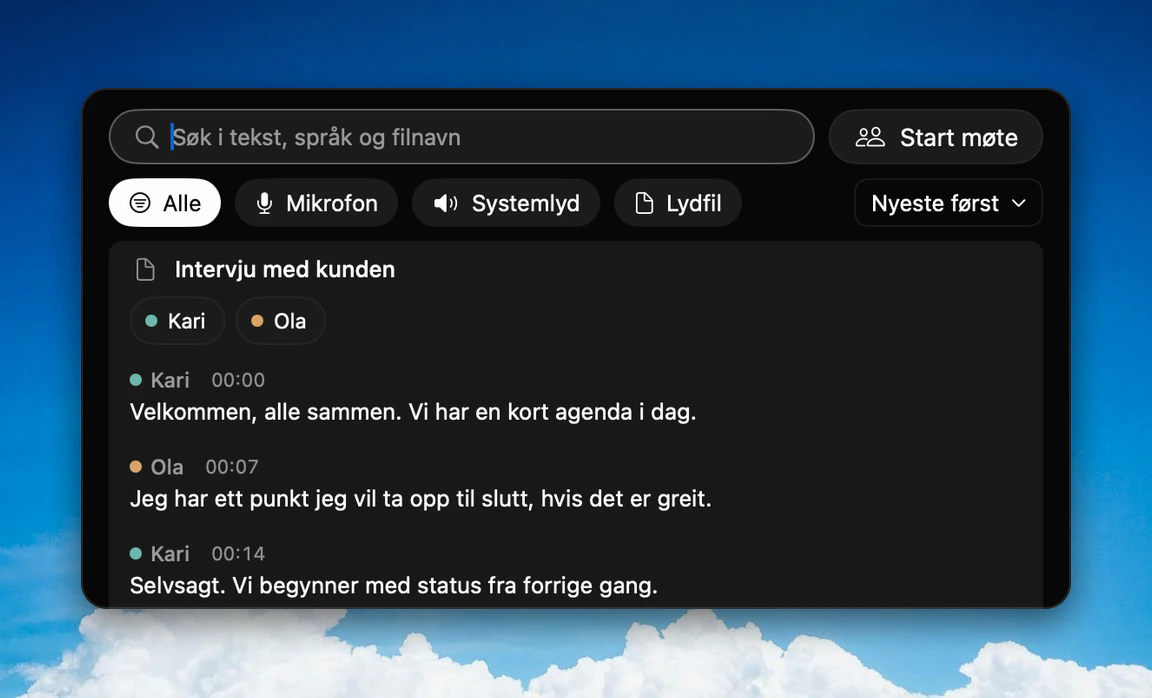
Turn on Vis talere (Show speakers) to see each line with a speaker and a timestamp. Rename Taler 1 and Taler 2 to real names or pseudonyms, then copy the text or export it as a plain-text file.
Norwegian meeting transcription
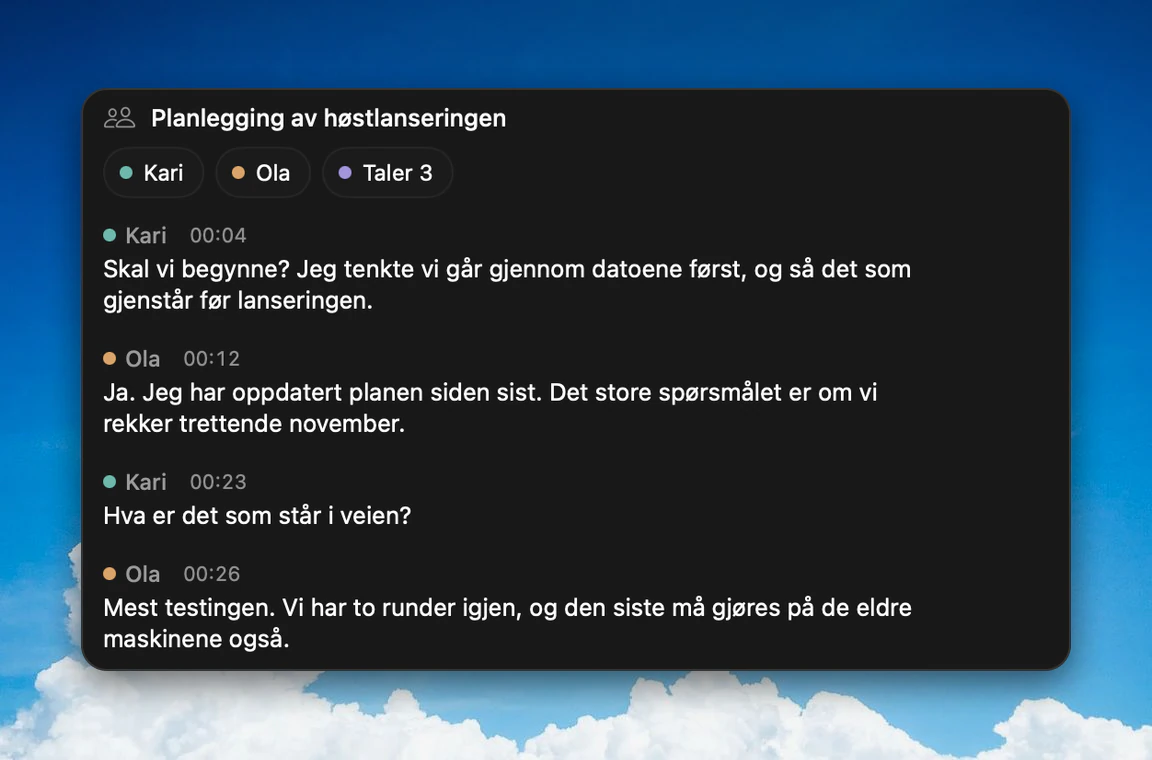
From Kviskr 0.7.0 you can record a meeting directly. Press Start møte (Start meeting) under Opptak or in the menu bar, and press Stopp when you are done. Kviskr transcribes the meeting and separates the speakers on your Mac. No bot joins the call, and nothing is sent to a meeting service.
- Meetings in a room are recorded with the microphone.
- For video calls there is a setting, Ta med lyd fra Macen (Include audio from the Mac), that also records what the Mac plays. It is new in 0.7.0, so make a short test recording with your own headset and call app before an important meeting.
- Voices are not remembered between meetings, so you name the speakers each time.
- Kviskr does not write the summary. You get the full transcript.
Tell the others that you are recording. Kviskr shows that reminder the first time you start a meeting. More, in Norwegian: Transkriber møter på norsk.
How accurate is it on Norwegian?
NB-Whisper was trained by the National Library of Norway on around 66,000 hours of Norwegian speech. Its paper reports a 2.2% word error rate for NB-Whisper Large on read bokmål in the NST dataset, against 6.8% for OpenAI's Whisper Large-v3. Read speech is the easy case. Free conversation is harder, and in our own measurements most of the difference is words that get left out when people talk fast, quietly or over each other.
Kviskr has measured its own models on public Norwegian test sets. The table shows how many words out of 100 were left out. Standard is the model that comes with the app. Ekko (beta) is Kviskr's own model, trained further from NB-Whisper Large, and can be downloaded from 0.7.0.
| Test set | Words left out, Standard | Words left out, Ekko (beta) |
|---|---|---|
| NB Samtale: free conversation (500 clips) | 21.2 | 10.2 |
| NB Tale: spontaneous speech, all regions (302 clips) | 4.5 | 1.8 |
| NorGovPCC: government press conferences (200 clips) | 17.6 | 5.0 |
NB Samtale: free conversation (500 clips)
- Words left out, Standard
- 21.2
- Words left out, Ekko (beta)
- 10.2
NB Tale: spontaneous speech, all regions (302 clips)
- Words left out, Standard
- 4.5
- Words left out, Ekko (beta)
- 1.8
NorGovPCC: government press conferences (200 clips)
- Words left out, Standard
- 17.6
- Words left out, Ekko (beta)
- 5.0
Per 100 words in the reference, lower is better. Ekko gets slightly more words wrong in free conversation (8.9 against 7.4 per 100), because it writes down words Standard skips. Measured 11 October 2026. Full method and all five test sets, in Norwegian: kviskr.no/metode.
Bokmål, nynorsk and dialects
Norwegian has two written standards, and the speech model cannot tell from the audio which one you want. You choose Norsk (bokmål) or Norsk (nynorsk) in the settings or the menu bar, and Kviskr writes in that standard whatever dialect is spoken. Nynorsk in free conversation is the hardest case we have measured: on the 124 nynorsk clips in NB Samtale, Standard left out 24.3 of 100 words and got 10.3 wrong, against 21.2 and 7.4 for the whole test set. Names and technical terms that keep coming out wrong can go in the vocabulary (Ordbok).
Other ways to transcribe Norwegian
Several good services transcribe Norwegian, and some use the same speech model as Kviskr. The main difference is where the audio goes and who may use the service. At the University of Oslo, Autotekst runs on the university's own servers. At NTNU, Speech to text is for public and internal data only. Jojo from the newspaper VG is local like Kviskr. transkribere.no and TurboScribe are cloud services you upload to.
| Tool | Where the audio is processed | Who can use it | Speech model |
|---|---|---|---|
| Kviskr | On your Mac | Anyone with an Apple silicon Mac | NB-Whisper, Ekko (beta) |
| Autotekst (University of Oslo) | UiO servers, approved up to red (confidential) data | UiO staff and students; other non-commercial organisations can buy access | NB-Whisper or OpenAI Whisper |
| Speech to text (NTNU) | NTNU service, public and internal data only | NTNU users, on the NTNU network or VPN | NB-Whisper Large or OpenAI Whisper |
| Jojo (VG) | On your Mac | Anyone with a Mac (macOS 13+) | Whisper; NB-Whisper can be downloaded |
| transkribere.no | Servers in the EU, files deleted within 24 hours | Anyone, from NOK 0.49 per minute | Not stated |
| TurboScribe | Cloud | Anyone; 3 files of up to 30 minutes a day without paying | Whisper large-v2 |
Kviskr
- Where the audio is processed
- On your Mac
- Who can use it
- Anyone with an Apple silicon Mac
- Speech model
- NB-Whisper, Ekko (beta)
Autotekst (University of Oslo)
- Where the audio is processed
- UiO servers, approved up to red (confidential) data
- Who can use it
- UiO staff and students; other non-commercial organisations can buy access
- Speech model
- NB-Whisper or OpenAI Whisper
Speech to text (NTNU)
- Where the audio is processed
- NTNU service, public and internal data only
- Who can use it
- NTNU users, on the NTNU network or VPN
- Speech model
- NB-Whisper Large or OpenAI Whisper
Jojo (VG)
- Where the audio is processed
- On your Mac
- Who can use it
- Anyone with a Mac (macOS 13+)
- Speech model
- Whisper; NB-Whisper can be downloaded
transkribere.no
- Where the audio is processed
- Servers in the EU, files deleted within 24 hours
- Who can use it
- Anyone, from NOK 0.49 per minute
- Speech model
- Not stated
TurboScribe
- Where the audio is processed
- Cloud
- Who can use it
- Anyone; 3 files of up to 30 minutes a day without paying
- Speech model
- Whisper large-v2
Checked on each service's own website on 11 October 2026. Prices and rules change, so check the service before you decide.
Privacy
The audio and the speech recognition stay on your Mac, and there is no account. Kviskr keeps a copy of each imported file next to the text and deletes both after 30 days unless you change it. Kviskr does not encrypt its history itself, so turn on FileVault. The optional AI modes are off by default. When one is on, the transcribed text, never the audio, is sent to the provider you chose.
What you need
A Mac with Apple silicon (M1 or later) and macOS 15.1 or later. The app takes about 1.3 GB with the standard Norwegian model. Menus and help are in Norwegian, and you are welcome to email hei@kviskr.no in English. For dictation into any app, see Norwegian dictation on Mac.
Frequently asked questions
Transcribe your first Norwegian recording locally.
Free during early access. No account needed. Requires macOS 15.1 or later and Apple silicon.
Or install with Homebrew